
Formation types (Field View)
- Open Lists and select a Shortlist or Shadow Team.
- Switch to Field View in the page toolbar if needed.
- Tap on an empty position slot (or next to a position).
- Search and select the player, then confirm.
View options
- On formation lists in Field View, use View options to choose which details appear on player cards.
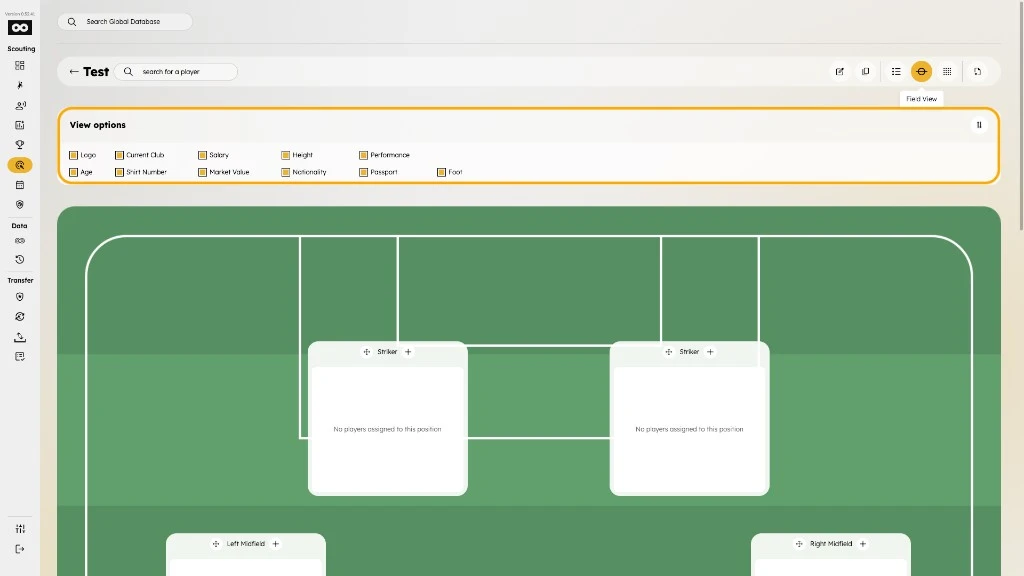
- Toggle any combination of Logo, Current Club, Salary, Height, Performance, Age, Shirt Number, Market Value, Nationality, Passport, and Foot.
- Enable Nationality and Passport to show nationality and passport area flags on player cards. Flags include tooltips with the area name.
List (no formation)
- Open a List type (table only).
- Use the add action in the list toolbar.
- Search and select the player, then confirm.